
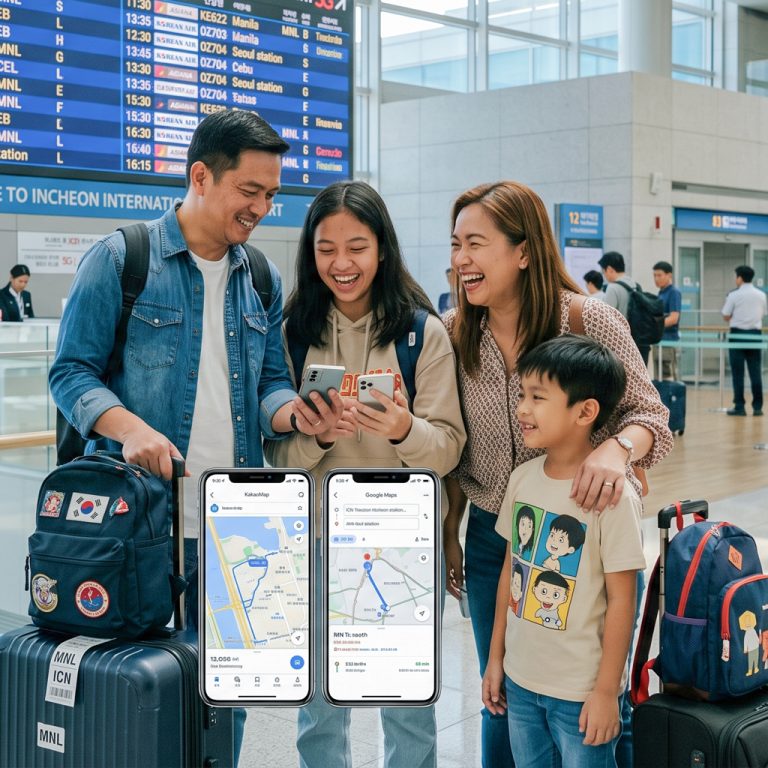
Landing at Incheon or Gimpo Airport without a working data connection can bring your South Korea adventure to an immediate halt. South Korea operates within its own digital ecosystem—standard tools like Google Maps lack walking and driving directions due to local mapping regulations, requiring travelers to rely on local platforms like Naver Map, KakaoMap, and Kakao. An embedded SIM (eSIM) is the fastest, most reliable way to stay connected nationwide without waiting in airport terminal lines, renting pocket Wi-Fi routers, or handling tiny plastic SIM cards.
Why Choose an eSIM for South Korea
-
Instant Digital Delivery: Buy online before departure and receive your QR code in your email within minutes—no physical pickup required.
-
Keep Your Home Number Active: Dual SIM capability allows you to keep your primary physical SIM active for bank OTPs and emergency calls while using the Korean eSIM solely for high-speed local data.
-
No Bulky Hardware: Unlike pocket Wi-Fi routers, there is no separate device to charge, carry around, or return before flying home.
-
Top-Tier Network Access: Travel eSIMs connect directly to South Korea’s leading telecommunication networks (SK Telecom, KT, or LG U+), ensuring ultra-fast 4G/5G speeds even inside deep subway lines and rural KTX routes.
How to Install and Activate Your Korea eSIM
-
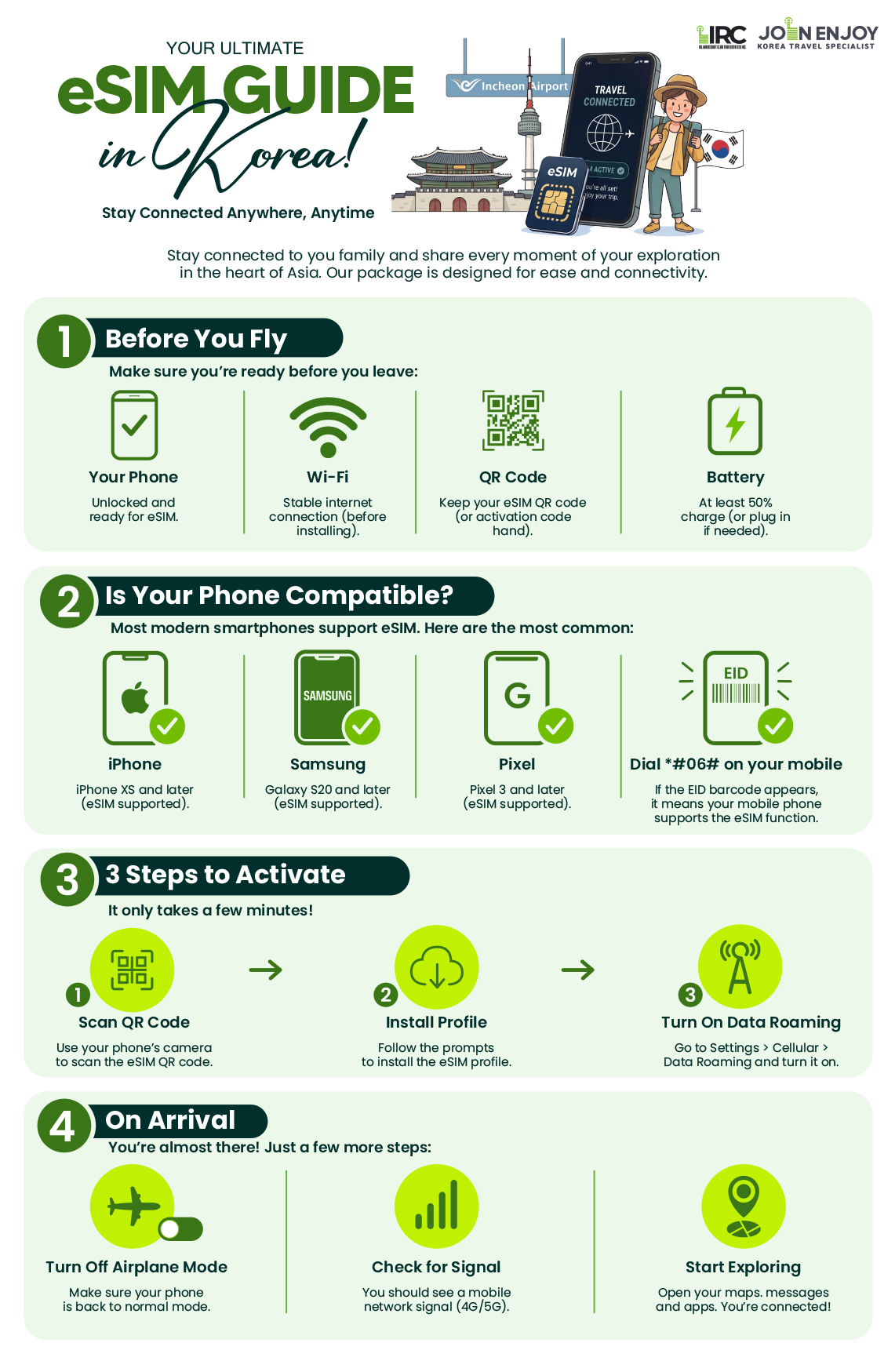
Step 1: Check Device Compatibility & Unlock Status
Ensure your smartphone supports eSIM functionality (iPhone XS and newer, Samsung Galaxy S20 and newer, Google Pixel 3 and newer) and is carrier-unlocked.
-
Step 2: Add Cellular Plan Before Flying
Connect to a stable home or airport Wi-Fi network. Go to your phone’s Settings > Cellular / Mobile Service > Add eSIM, then scan the QR code provided by your vendor. Label the label profile as “Korea Travel.”
-
Step 3: Activate Data Roaming Upon Landing
Once your flight touches down in South Korea, switch your primary Mobile Data line to your Korea eSIM profile. Turn Data Roaming ON for the eSIM line, wait 30 to 60 seconds, and your device will connect automatically to the local network.

Setup & Usage Questions (FAQ)
-
Should I Install my Korea eSIM before flying?
Yes. Install it while you still have reliable Wi-Fi, but follow provider instructions before activating,
as some plans start their validity period immediately upon activation. -
How do I know whether my phone supports eSIM?
Check that your exact phone model supports eSIM and is carrier-unlocked. A compatible model
will not work if it remains locked to your home carrier. -
Do I need to turn on data roaming?
Yes, turn Data Roaming ON for the Korea eSIM line only. Keep Data Roaming OFF for your primary home SIM to avoid unwanted roaming charges.
-
What should I do if the eSIM has no data upon arrival?
Make sure the eSIM line is turned ON, set as the primary Mobile Data source, and Data roaming is enabled. If it still doesn’t connect, restart your phone or check the APN settings.
What devices are compatible with eSIM?
How to check if your device is compatible with eSIM
To use an eSIM, your device must meet the following conditions: The device is compatible with eSIMs. The device is not carrier or network-locked. The device is not jailbroken (iOS) or rooted (Android). You can use our list to see if the device you want to use is eSIM-compatible.
Note: Some regional models may not be compatible with eSIMs. Most devices purchased in China and Hong Kong are not compatible with eSIMs. Please check online to confirm if your device is compatible.
The following devices are compatible with eSIMs.
Apple devices:
- iPhone
- iPhone 17/ Pro/ Pro Max
- iPhone Air
- iPhone 16/ 16e/ Plus/ Pro/ Pro Max
- iPhone 15/ Plus/ Pro/ Pro Max
- iPhone 14/ Plus/ Pro/ Pro Max
- iPhone 13/ Mini/ Pro/ Pro Max
- iPhone 12/ Mini/ Pro/ Pro Max
- iPhone 11/ Pro/ Pro Max
- iPhone XS/ XS Max
- iPhone XR
- iPhone SE (2020 and 2022)
- iPad (only iPads that can use 4G data)
- iPad (from 7th generation)
- iPad Air (from 3rd generation)
- iPad Pro, 11-inch (from 1st generation)
- iPad Pro 12.9-inch (from 3rd generation)
- iPad Mini (from 5th generation)
- The following Apple devices are not compatible with eSIM:
- iPhone devices from Mainland China (except iPhone Air).
- iPhone devices from Hong Kong and Macau (except iPhone 13 Mini, iPhone 12 Mini, iPhone SE 2020, and iPhone XS).
- For iPhones and iPads purchased in Turkey:
- Please note that according to Turkey’s local regulation, to use roaming data services for 91 days (accumulated) or more per 120 days period, the device’s IMEI should be registered with the Central Equipment Identity Register of Turkey. We kindly advise you to contact the CEIR for more information. If you have any questions, please feel free to contact our customer support.
- If you’re setting up your device after June 23, 2020, your eSIM will be activated after installation. Contact your carrier if you don’t have eSIM enabled.
- For devices set up before June 23, 2020, follow the steps below to activate your eSIM. You must reset your device to complete the following procedure. Make sure to back up your device beforehand. 1) Make sure your back up is updated to the latest iOS or iPadOS. 2) Tap Settings > General > Transfer or Reset. 3) Tap Erase All Content and Settings. 4) When asked, enter your passcode or Apple ID password. Then confirm that you want to erase all content. 5) After the erase is complete, restore your iPhone or iPad from your backup. 6) Once done, set up an eSIM on your device.
Only iPad devices with Wi-Fi + Cellular features are compatible with eSIM.
Samsung devices:
-
Galaxy A56*
-
Galaxy A55 5G*
-
Galaxy A54 5G*
-
Galaxy A36*
-
Galaxy A35 5G*
-
Galaxy A23 5G*
-
Galaxy XCover7 Pro
-
Galaxy Z Flip/ 5G/ 3 5G/ 4/ 5/ 6
-
Galaxy Z Fold/ 2 5G/ 3/ 4/ 5/ 6
-
Galaxy Note 20/ 5G/ Ultra/ Ultra 5G
-
Galaxy S20/ 5G/ Ultra/ Ultra 5G
-
Galaxy S20+/ 5G
-
Galaxy S21 5G/ Ultra 5G
-
Galaxy S21+ 5G
-
Galaxy S22 5G/ Ultra 5G
-
Galaxy S22+ 5G
-
Galaxy S23/ 5G/ FE/ S23+/ Ultra
-
Galaxy S24/ S24+/ Ultra/ FE
-
Galaxy S25/ Edge/ S25+/ Slim/ Ultra
-
Galaxy Fold
-
The following Samsung devices are not compatible with eSIM:
-
All Galaxy devices from China, Hong Kong, and Taiwan.
-
All Galaxy FE “Fan Edition” models, except the Galaxy S23 FE and S24 FE.
-
USA models of the Galaxy S20, S21*, and Note 20 Ultra. Most Samsung Galaxy devices purchased in South Korea are not compatible with eSIMs, except Galaxy S24, S23, Z Fold 5, Z Fold 4, Z Flip 5, Z Flip 4, and A54 5G variants.
Google Pixel devices:
-
Pixel 10
-
Pixel 9/ 9a/ Pro/ Pro XL/ Pro Fold
-
Pixel 8/ 8a/ Pro
-
Pixel 7/ 7a/ Pro
-
Pixel 6/ 6a/ Pro
-
Pixel 5/ 5a/ 5a 5G
-
Pixel 4/ 4a/ 4a 5G/ XL
-
Pixel 3/ 3a/ XL/ 3a XL
-
Pixel 2/ XL
-
Pixel Fold
-
* The following Google Pixel devices are not compatible with eSIM:compatible with eSIM:
-
Pixel 3 models originating from Australia, Taiwan, and Japan, and those purchased with service from US or Canadian carriers other than Sprint and Google Fi.
-
Pixel 3a models purchased in South East Asia and with Verizon service.
Hammer devices:
- Explorer PRO
- Blade 3
- Blade 5G
- myPhone NOW eSIM
- myPhone Hammer Construction
- eSIM compatibility can depend on regions. Please contact your carrier or device manufacturer to confirm that your device is compatible with eSIM.
Honor devices:
- HONOR 90
- HONOR 200/ Pro
- HONOR 400/ Lite/ Pro
- Magic7 Pro/ Lite
- Magic6 Pro/ Pro RSR
- Magic Vs3/ V2/ V3
- Magic5 Pro
- Magic4 Pro
- eSIM compatibility can depend on regions. Please contact your carrier or device manufacturer to confirm that your device is compatible with eSIM.
Huawei devices:
-
P40 / Pro*
-
Mate 40 Pro
-
* The following Google Pixel devices are not compatible with eSIM:compatible with eSIM:
-
Huawei P40 Pro+
-
All Huawei devices purchased in China
Motorola devices:
- Moto G34/ G35/ G53/ G54/ G54 Power/ G55/ G75/ G85/ G86
- Moto G (2025)/ G (2024)
- Moto G Power (2024)
- Moto G Stylus 5G
- Edge Fusion
- Edge 60/ Pro/ Fusion/ Stylus
- Edge 50 / Fusion/ Pro/ Neo/ Ultra
- Edge 40 Neo/ Pro
- Edge+/ Edge+ (2023)/ Edge+ (2024)
- Edge (2023)/ Edge (2022)
- Razr (2025)
- Razr+ (2025)
- Razr Ultra (2025)
- Razr 40/ 40 Ultra/ 50/ 50 Ultra/ 60
- Razr 2024
- Razr+ 2024
- Razr 2022/ 2019
- Razr 5G
- ThinkPhone 25
- eSIM compatibility can depend on regions. Please contact your carrier or device manufacturer to confirm that your device is compatible with eSIM.
Nokia devices:
- G60
- XR21
- X30
- eSIM compatibility can depend on regions. Please contact your carrier or device manufacturer to confirm that your device is compatible with eSIM.
ONEPLUS devices:
- OnePlus 13/ 13R/ 12/ 11/ Open
- eSIM compatibility can depend on regions. Please contact your carrier or device manufacturer to confirm that your device is compatible with eSIM.
Oppo devices:
- Find N2 Flip
- Find N5
- Find X5/ Pro
- Find X8/ Pro
- Find X3 /Pro
- Reno14/ Pro
- Watch X2 Mini
- eSIM compatibility can depend on regions. Please contact your carrier or device manufacturer to confirm that your device is compatible with eSIM.
RAKUTEN devices:
- Rakuten Big/ Big S
- Rakuten Mini
- Rakuten Hand/ 5G
- eSIM compatibility can depend on regions. Please contact your carrier or device manufacturer to confirm that your device is compatible with eSIM.
SHARP devices:
- AQUOS sense9/ sense8/ sense7/ sense7 plus
- AQUOS R10
- AQUOS R9/ Pro
- AQUOS R8/ pro/ R8s pro
- AQUOS wish
- AQUOS zero6
- eSIM compatibility is only available in Japan and certain regions. Please contact your carrier or device manufacturer to confirm that your device is compatible with eSIM.
SONY devices:
- Xperia 1 IV/ V/ VI/ VII
- Xperia 5 IV/ V
- Xperia 10 III Lite/ IV*/ V/ VI
- eSIM compatibility can depend on regions. Please contact your carrier or device manufacturer to confirm that your device is compatible with eSIM.
- Sony Xperia 10 IV can use eSIMs only in Europe. Please contact your carrier or device manufacturer to confirm that your device is compatible with eSIM.
TCL devices:
- 60/ XE NxtPaper
- 50 5G/ NxtPaper/ Pro NxtPaper
- 40 XL
- eSIM compatibility can depend on regions and carriers. Please contact your carrier or device manufacturer to confirm that your device is compatible with eSIM.
T-Mobile devices:
- Revvl 7/ Pro
- eSIM compatibility can depend on regions and carriers. Please contact your carrier or device manufacturer to confirm that your device is compatible with eSIM.
VIVO devices:
- X200/ Pro/ FE/ X200s
- X100 Pro
- X90 Pro*
- V29 (Europe and Latin America)* / Lite 5G (Europe)*
- V40/ Lite (Europe)*
- V50
- Watch 5
- eSIM compatibility can depend on regions and carriers. Please contact your carrier or device manufacturer to confirm that your device is compatible with eSIM.
Other devices:
- Fairphone 4/ 5
- Gemini PDA 4G+Wi-Fi
- Nothing Phone (3a) Pro
- Nuu Mobile X5
- Realme 14 Pro+
- ASUS Zenfone 12 Ultra
- ZTE nubia Flip2
- alcatel V3 Ultra
- For Surface devices: eSIMs can’t be used with any AT&T-locked devices. If your device was purchased through another carrier, the carrier may have disabled eSIM compatibility for Surface Duo.
WINDOWS 10* or WINDOWS 11 laptops:
- ACER
- Acer Swift 3/ 7
- Acer TravelMate P2/ Spin P4/ P6
- ASUS
- ASUS Mini Transformer T103HAF
- ASUS NovaGo TP370QL
- ASUS Vivobook Flip 14 TP401NA
- DELL
- Dell Latitude 7440
- Dell Latitude 7210 2-in-1
- Dell Latitude 9410
- Dell Latitude 7310
- Dell Latitude 7410
- Dell Latitude 9510
- Dell Latitude 5410
- Dell Latitude 5411
- Dell Latitude 5511
- HP
- HP Elitebook G5
- HP Probook G5
- HP Zbook G5
- HP Spectre Folio 13
- LENOVO
- ThinkPad X1 Titanium Yoga 2 in 1/ Carbon Gen 9/ Fold/ Nano
- ThinkPad X12 Detachable
- Lenovo Flex 5G
- Lenovo Yoga C630/ 520/ 720 (2-in-1 models)
- Lenovo Miix 630
- SURFACE
-
Surface Pro 9/Pro X
-
Surface Go 3
-
Surface Duo/Duo 2
-
For Windows 10 devices: Your PC needs to have Windows 10 version 1703 or later for you to use an eSIM. The device also needs to be LTE-ready.
-
For Surface devices: eSIMs can’t be used with any AT&T-locked devices. If your device was purchased through another carrier, the carrier may have disabled eSIM compatibility for Surface Duo.



Comment (0)